Google Calendar Sync
The calendar lives in Google Calendar, but the dashboards and notifications run in the homelab. Google Calendar Sync imports a private ICS feed into MariaDB and turns it into a local data source for widgets, APIs and email reminders.
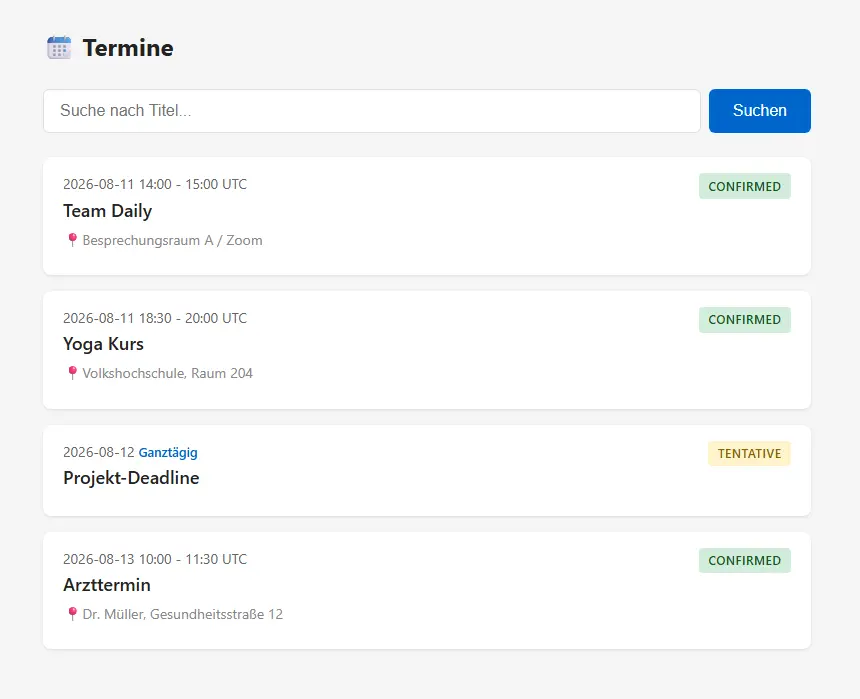
The web UI lists upcoming events and offers a search across the imported calendar.
Sync model
- ICS import, a private Google Calendar ICS feed is polled every 15 minutes by default.
- Recurring events, RRULE and EXDATE are expanded, and RECURRENCE-ID exceptions become individual event instances.
- Soft delete, events that disappear from the feed are marked as deleted instead of being removed immediately.
- Time window, the import covers a configurable window, by default 90 days in the past and 365 days in the future.
- Single direction, Google Calendar is the source. The homelab database is a read model, not a second calendar to write back to.
Web UI and API
- A FastAPI container serves the upcoming events, a search view and a health endpoint.
- The JSON API exposes events under
/api/eventsfor dashboards and other tools. - The API and web UI run as a separate container on port 8000, next to the sync worker.
- A local demo mode uses SQLite and sample events, so the UI and API can be tested without MariaDB or Docker.
Email notifications
- An optional daily HTML email lists the upcoming events at a configured hour and timezone.
- An optional weekly preview sends events for the next week that match configured search terms.
- The weekly mail only goes out when there are matching events, and each send is recorded in a log table.
Deployment and data
The sync worker and API run as Docker containers. Events live in MariaDB in the central LXC container, with an optional bootstrap mode that creates the database and user on first start. CI publishes the image to GHCR. The calendar view on the home dashboard reads from this service, and the database is covered by the normal database backup path.
See the Google Calendar Sync repository for the environment variables, database schema and compose setup.
The private ICS URL, calendar contents and notification addresses are not published here.